On-brand campaigns. No code, no bottlenecks.
The visual editor lets anyone on your team ship production-ready campaigns — without writing code and without waiting on designers.
Every campaign is built from your Email Design System, so the guardrails are already in place. Editors create freely; the brand stays intact.
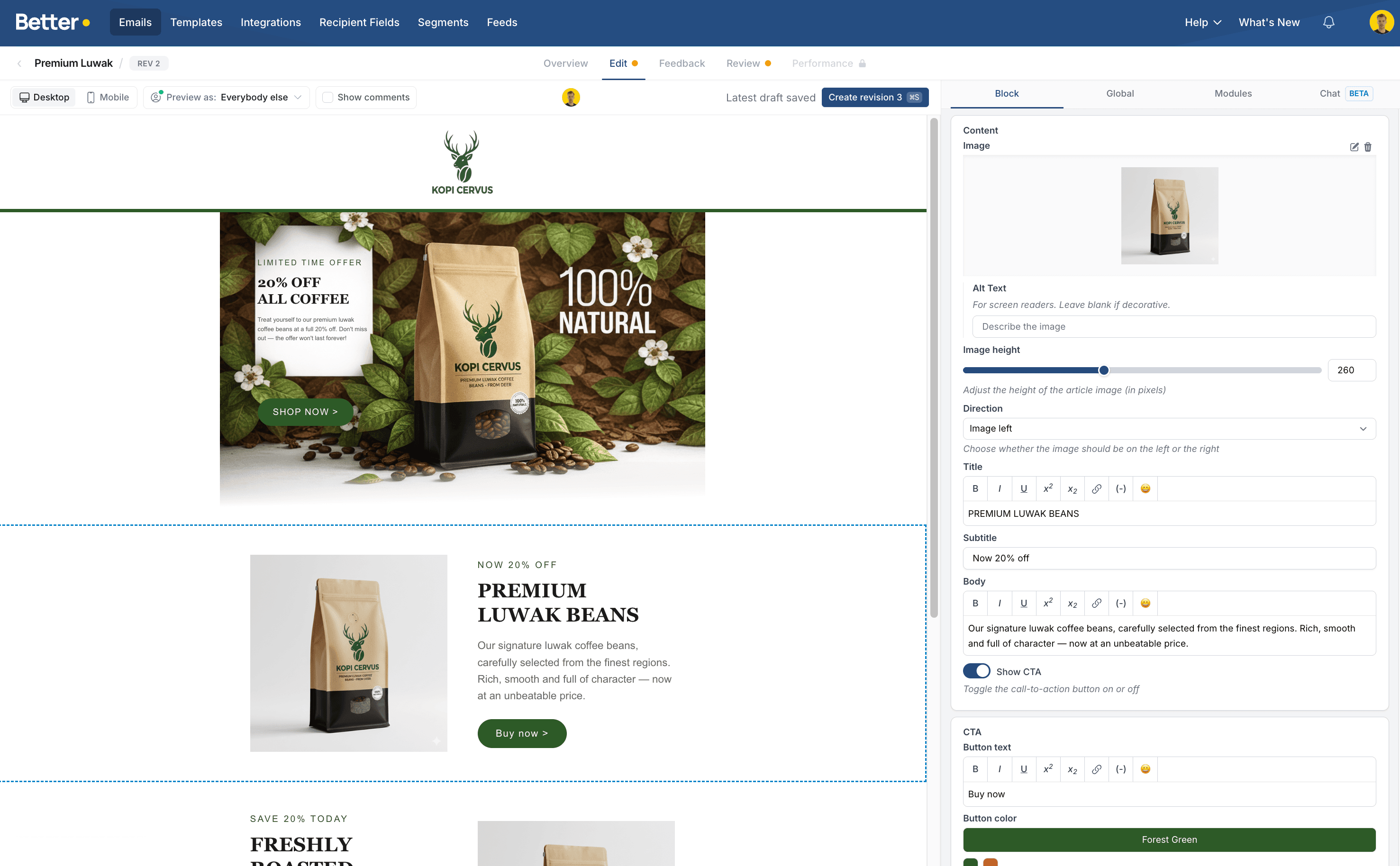
Freedom to create, without breaking the brand
The editor doesn't start from a blank canvas. It runs on your Email Design System — drag modules into place, and content zones control exactly what can go where. Editors move fast; designers stay in control.
Drag-and-drop modules
Pick modules from your design system — headers, heroes, product lists, CTAs — and drop them into place. Reorder with a simple drag. No code required.
Content zones control what goes where
Designers define which modules are allowed in each zone of the email. Editors can only place things where they belong — so every layout that's possible is a layout that works.
On-brand by default
Brand elements are locked in the design system, so nothing an editor does in the editor can break them.
Editing that feels like filling in the blanks
Every module exposes exactly the inputs it needs — nothing more. That's what makes it fast for editors and safe for the brand.
Inline rich text
Click any editable text and type directly in the email. Bold, links, lists — formatted as you write.
Brand-palette color pickers
Color pickers are limited to your brand palettes. Every color choice is a correct one.
Image upload with optimization
Drop in an image and it is automatically optimized for email — sized, compressed, and ready to send.
Selects & toggles
Layout variants, show/hide options, and preset choices — exposed as simple dropdowns and switches.
Repeatable groups
Product lists, article roundups, event line-ups — add, remove, and reorder items in a group with a click.
Subject line & preheader
Write and edit the subject line and preheader in the same workspace as the email itself.
See exactly what your recipients will see
The preview renders instantly as you edit — no refresh, no waiting. Flip between desktop and mobile widths to check every breakpoint before anything ships.
Desktop and mobile widths
Switch between views instantly and see how your email renders on any screen size.
Instant rendering
Every change appears the moment you make it. What you see in the editor is what lands in the inbox.
HTML source view
Want to see what's under the hood? Inspect the generated HTML output at any time.
Work together, never lose work
The editor is built for teams working at the same time — with a safety net under every change.
Real-time collaborative editing
Multiple people can edit the same campaign simultaneously. Live presence avatars show who's in the campaign and where they're working — no version conflicts, no "final_v3" files.
More on collaborationAuto-save on every change
Every single change is saved automatically the moment you make it. Close the tab, switch devices, come back tomorrow — your work is exactly where you left it.
Revision history with restore
Browse the full history of a campaign and restore any earlier revision with one click. Experiment freely — you can always roll back.
Betty works in the editor with you
Betty, your AI sidekick, can build and edit alongside you in the very same campaign. Ask her to draft a section or make a change — then take over in the editor whenever you like. Same modules, same guardrails.
Meet BettyThe editor is one piece of the platform
See how it fits together with the rest of Better Email.
See the editor in action
Watch your team go from brief to on-brand campaign — no code, no bottlenecks.
Request a demo