
For banks, insurers and other regulated businesses

Nothing reaches your ESP until Compliance signs off

Build, check and approve campaigns before they go to Salesforce Marketing Cloud or another ESP. Legal text is locked into the modules your team builds from, and your own compliance rules run on every revision. With the export gate set to block, nothing is exported until every required approval is in.

Example: a personal loan campaign that can’t be exported yet. A custom check has found a rate without a representative example, and the campaign is waiting for Compliance, the second of three approval stages.
  • Co-op

    UK co-operative with insurance and legal services businesses

  • Tryg

    Scandinavia’s largest non-life insurer

  • Undo

    Danish digital insurer

01/Design system

Every campaign starts on brand, with the legal text in place

Your developers build the Email Design System once: modules, brand rules and the legal copy each campaign needs. Marketers build from it and can change only the fields you expose.

Locked footers and disclaimers
Regulatory status lines, FSCS statements and unsubscribe text live in the design system, where editors can’t change them. A template can check that a required footer is there and add it if it’s missing.
Rules on each field
Required fields, character limits, link and tracking patterns, brand colours only and required alt text, each with an error message in your words.
Design system changes are tested first
Prepare changes as a test version, preview it against live campaigns, then publish it with a comment. Live campaigns keep the current version until you publish.
Separate brands and business units
Each brand can have its own design system, folders and ESP integrations, with access limited to the right groups.
Loan offer module

Editor view

  • Headline

    Editable · Up to 60 characters

  • Rate

    Editable · Format: 0.0% APR

  • Representative example

    Editable · Required

  • Button link

    Editable · https only, tracking required

  • Footer and regulatory text

    Locked · Set in the design system

The editor fills in the offer. The footer comes from the design system and has no field to edit.

02/Pre-flight checks

Your compliance rules, written in plain language

Each revision is checked for broken links, personalisation that didn’t fill in, placeholder copy, accessibility against WCAG 2.2 AA and how the email renders. Your own rules run alongside. AI checks the campaign against them, and you set each rule to warn or to block export.

Example rules

  • Representative example

    Block

    Lending

    “If the campaign mentions an interest rate, APR or any cost of credit, include a representative example and label the APR ‘representative’.”

  • Regulatory status line

    Block

    Every brand

    “The footer must carry the status line and Financial Services Register number for the company behind this brand.”

  • Capital at risk

    Block

    Investments

    “If the campaign promotes investing, show ‘Capital at risk. The value of investments can go down as well as up, and you may get back less than you invest.’ before the first call to action.”

  • Insurer and IPID

    Block

    Insurance

    “If the campaign promotes home, car or travel insurance, name the insurer that underwrites it and link to the IPID.”

  • No pressure on credit

    Warn

    Consumer Duty

    “In campaigns about loans, credit cards or overdrafts, flag urgency such as ‘act now’ or ‘last chance’, unless the campaign states a real end date.”

  • Plain English

    Warn

    Tone of voice

    “Short sentences, no jargon and no exclamation marks. Explain a financial term the first time it appears.”

Warn or block
A warning leaves the decision to the team. A block stops the export until the campaign passes or someone you’ve allowed overrides it.
Taught with examples
Add campaigns that should pass and campaigns that should fail, and set how sure the check must be before it flags something.
Checks come before review
By the time Compliance opens a campaign, the legal text is in place and your rules have run. Compliance still reviews and approves it.

All pre-flight checks

03/Approvals

Compliance and Legal approve in their own stages

Set up approval stages in the order your sign-off policy follows. Only the open stage is asked, and the next stage gets its request once everyone required has approved.

Groups as approvers
Add Compliance or Legal as a group. Any one member’s approval counts for the group.
No approving your own work
If Compliance has to approve, the person who created the campaign can’t approve for Compliance, even if they work there.
Approval belongs to a revision
An approval counts only for the revision it was given on. A new revision starts again at stage one.
Stages set per campaign type
Every new campaign of a type starts with its stages. Only an admin can remove a required approver such as Legal.
Outside reviewers
Agencies and outside counsel get a private link by email when their stage opens, and review without a Better Email account.
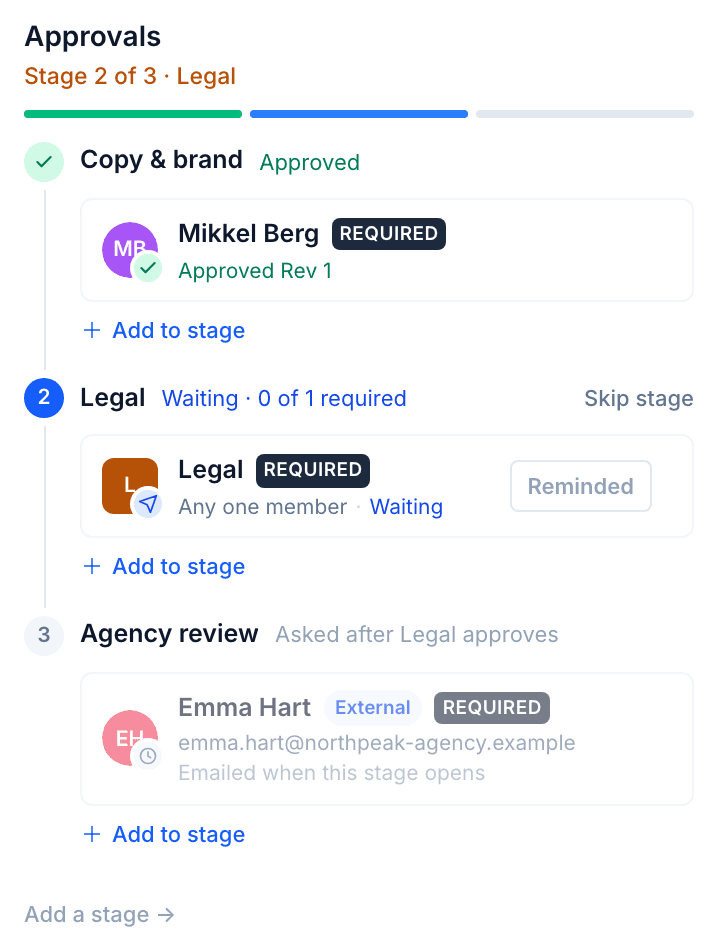
The approvals panel on stage 2 of 3: Copy and brand approved, the Legal group asked with any one member able to approve, and an external agency reviewer emailed when their stage opens
Stage 2 of 3 in Better Email. Copy and brand has approved and the Legal group is waiting.

04/Audit trail

Who approved what, and when

Each campaign carries its own history, and the organisation audit log covers everything else.

Campaign timeline
Comments, approvals and exports on the campaign, with the revision each approval was given on.
Export trail
Who exported the campaign, when, to which platform, and with what result.
Organisation audit log
Sign-ins, role changes, permission denials, design system releases, approvals, exports and AI actions, searchable and filterable. On Enterprise plans, the full audit log goes back at least a year.
Timeline

Personal loan, spring rates

  1. Anna Lee created revision 5

    Mon 09:12
  2. Pre-flight 31 of 31 checks passed

    Mon 09:13
  3. Mikkel Berg approved revision 5 for Copy and brand

    Mon 14:40
  4. Sara Patel approved revision 5 for Compliance

    Tue 11:02
  5. James Okafor approved revision 5 for Legal

    Wed 10:31
  6. Anna Lee exported revision 5 to Salesforce Marketing Cloud

    Wed 10:34
The loan campaign from the top of the page, after the representative example was added. The names are examples.

05/AI

Betty works under the same rules

Betty, Better Email’s AI agent, builds campaigns from your design system in your tone of voice. Her work goes through the same checks and approval stages as everyone else’s.

Same permissions as the user
Betty can only do what the person using her can do. That access can be withdrawn, and the audit log records every action she takes.
Your own AI provider
Run Betty on your own Amazon Bedrock or Anthropic account. With Bedrock in an EU region such as Frankfurt, content stays in the EU. It is never used to train models.
Extra approval for AI content
Campaigns with AI-generated blocks can require an approval of their own, and admins can turn AI Blocks off.

Where AI processing runs and which providers are involved: AI on the security page

06/Customers

In production at Co-op and Tryg

Co-op
  • UK’s largest consumer co-operative
  • Salesforce Marketing Cloud

Co-op sends more than 500 million customer communications a year and replaced five design systems with one. Role profiles, release management and audit logging were developed with Better Email to fit a 27-person team.

“Built by experts who understand the intricacies of great email communication, Better Email gives us the flexibility and functionality to create accessible, on-brand campaigns at scale.”
Tara Knowles, Lead CRM Technology Developer, Co-op
Read the Co-op case study
Tryg
  • Scandinavia’s largest non-life insurer
  • Adobe Campaign

Tryg had all three brands live in three days and was one of the first insurers in Denmark to make its email marketing meet the European Accessibility Act.

“Better Email completely changed how we work with email. Our campaign specialists can focus on strategy and segmentation, while the rest of the team handles content confidently. And we know every email is accessible and on-brand.”
Sarah Logis Winblad, Customer Concept Manager (prev. CRM Manager), Tryg
Read the Tryg case study

07/Security

Security, data and third-party risk

Better Email ApS is a Danish company. Your campaigns, design systems and user accounts are stored and processed in the EU. Better Email doesn’t send, so campaigns already exported still go out if Better Email is down.

Data location
EU
Storage and processing in the EU. AI can run in the EU on your own provider.
Identity
SSO · SCIM · MFA
SAML and OIDC, with MFA enforced by your identity provider.
Uptime
99.9%
Monthly, under the Enterprise SLA, with a public status page.
Incident notice
24 h
Enterprise customers are told within 24 hours of us becoming aware of an incident that affects them.

On request: CAIQ-Lite answers, business continuity and exit plans, and a penetration test summary under NDA. For EU financial entities, the DORA statement covers the register of information and the contract terms DORA requires.

08/Questions

Common questions

No. Campaigns are built, checked and approved in Better Email, then exported to Salesforce Marketing Cloud, Adobe Campaign, Microsoft Dynamics 365 or the ESP you already use. Sending stays there.

No. Another member of Compliance has to approve it, even if the person who created the campaign works in Compliance.

Only admins can change the controls. An admin decides whether a missing approval blocks export, can skip a stage for one revision, and is the only one who can remove a required approver such as Legal from a campaign type. Skips are logged. You choose who may override a blocking check. Edits made in your ESP after export happen outside Better Email.

On Enterprise plans, the full audit log, including every approval and export, goes back at least a year.

A finding that’s wrong can be dismissed, and the dismissal is tracked. If a check misses something, the campaign still goes through your approval stages.

Changes go into a new revision, and approvals count only for the revision they were given on. Approval starts again at stage one.

Storage stays in the EU. By default, AI features use US providers under Standard Contractual Clauses and the UK Addendum, and email client previews are rendered in the US when you ask for one. Run AI on your own Amazon Bedrock account in an EU region to keep it in the EU.

No. DORA places its obligations on EU financial entities. Our DORA statement sets out what we provide so they can meet theirs: register-of-information details, the Article 30 contract terms, incident notification within 24 hours and an exit plan.

Bring a rule your Compliance team checks by hand

Book 15 minutes. Send the rule ahead of the call, and we’ll show it running as a pre-flight check on a campaign.