Build campaigns with your own AI agent
Point ChatGPT, Claude, Gemini, or an agent you built at Better Email. Ask for a campaign and it gets built from your organization's own components, on brand, checked, and ready for your team to review.
Works with
01/Why it matters
AI writes the first draft. Better Email makes it production ready.
An agent on its own produces HTML nobody wants to ship. An agent working through Better Email produces a campaign your team can review, approve, and send.
01
From brief to draft in one conversation
Describe the campaign where you already work with your agent. It picks the right design system, creates the draft, and assembles it block by block. No tab switching, no copy and paste.
02
On brand by construction
The agent can only place the components your Design System allows, with your fonts, colors, and modules. The output is your brand assembled well. It cannot write freehand HTML.
03
Checked before anyone looks
Pre-flight runs on the draft, the agent can screenshot the rendered campaign, and every edit is a checkpoint you can roll back. Your team reviews a finished draft, not a first attempt.
02/Side by side
Talk to the agent. Watch the campaign change.
Put the Better Email editor next to the chat and the conversation stops being blind. Ask for a new headline, see it appear. Ask for a new image, see it drop in.
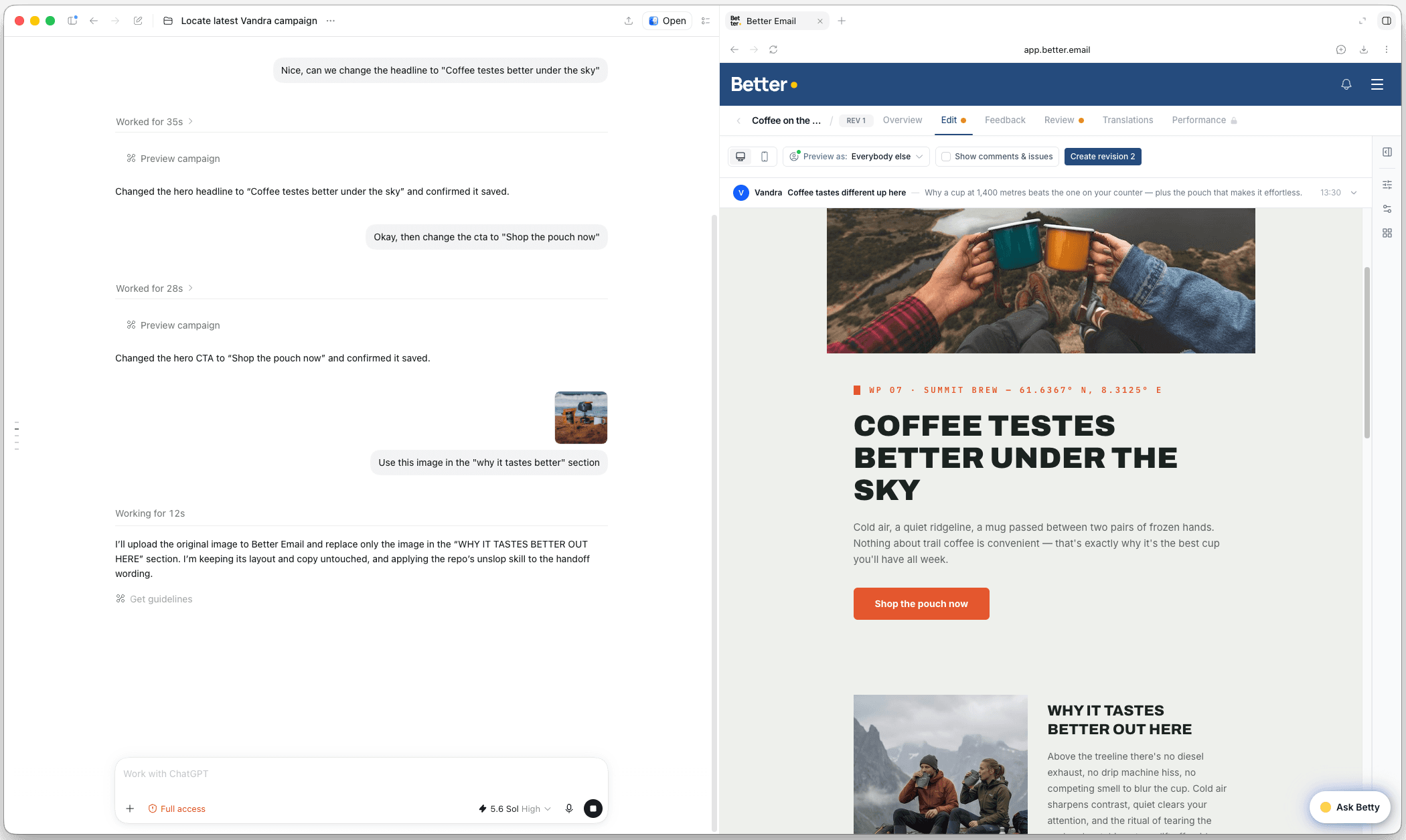
Chat on one side, the campaign on the other
Open Better Email in the browser panel next to your chat. Every change the agent makes shows up in the editor as it lands, so you see the campaign, not a description of it.
Take over whenever you want
The panel is the real editor. Drag a block, tweak a headline, swap an image yourself, then hand the next change back to the agent. Both work on the same draft.
Nothing to install
This is the browser panel built into ChatGPT, signed in with your normal Better Email login. Any client that can open a web page next to the chat works the same way.
03/Governed creation
Any agent, the same guardrails as Betty.
External agents get the same tool surface Betty uses, so they inherit the same limits. Your Design System decides what can be built. The agent decides how fast.
01
Brief
You ask your agent for a campaign, in your own words.
02
Better Email MCP
The agent signs in as you and gets the same tools Betty uses.
03
Built from your components
The draft is your Design System assembled well, never freehand HTML.
04
Checked and checkpointed
Pre-flight runs on the draft. Every edit is a checkpoint you can roll back.
05
Review and ship in Better Email
Approvals and ESP export happen in the app, exactly as they do today.
MCP is the open standard for connecting AI tools to external systems. Because it is open, Better Email sits next to your CRM, analytics, and project tools in the same conversation, and you are never tied to one AI model or vendor.
04/Tool surface
Campaign creation and editing, as tools.
The first release covers building and editing drafts. It is the same tool surface Betty uses, so an external agent gets the same guardrails Betty has.
Find and organize
List and search campaigns, browse folders and design systems, read the organization profile, and duplicate or move campaigns to where they belong.
Build campaigns
Create a campaign from a design system, list its components, then insert, update, move, and delete blocks. Set subject and preheader. Every block is one of your own.
Check before anyone reviews
Read a campaign and its blocks, run pre-flight checks on the draft, list recipient fields for personalization, and take a screenshot of the rendered campaign.
Governed by default
The agent acts as you, with exactly your permissions, in the organization you chose. Sessions are visible in Connectors, and every draft edit is a checkpoint you can roll back.
05/Connect your AI
Connected in a minute.
Any MCP client that follows the current spec connects. Sign-in is OAuth 2.1 through the login your team already uses.
Claude Code
claude mcp add --transport http better-email https://mcp.better.email/mcpEvery other client
https://mcp.better.email/mcpRolling it out across a team and want to talk through permissions first? Talk to us.
- 01
Add the server
One line in Claude Code. In ChatGPT, claude.ai, Claude desktop, Gemini, or your own agent, add the URL as a streamable HTTP MCP server.
- 02
Sign in like you always do
Your client opens the browser. Sign in with your normal Better Email login and pick the organization. No API keys, no admin ticket.
- 03
Ask for a campaign
The agent acts as you, with your permissions. Every session is listed under Settings, Betty AI, Connectors, with a Disconnect button.
06/FAQ
Questions, answered.
What is the Better Email MCP server?
It is a Model Context Protocol server, hosted at mcp.better.email/mcp, that gives any MCP client access to your Better Email workspace. Your agent can find campaigns, create drafts from a design system, edit blocks, set subject and preheader, and run pre-flight checks, all without leaving the conversation.
Who is it for?
Marketers and email teams who already work in Better Email and want to build campaigns from their AI tools, and the operators building agent workflows around them.
What can the agent do today?
List and search campaigns, list folders and design systems, read the organization profile, create a campaign from a design system, duplicate and move campaigns, read a campaign and its blocks, list the design system components, insert, update, delete, and move blocks, set subject and preheader, run pre-flight checks, list recipient fields for personalization, and screenshot the rendered campaign.
How does sign-in work?
OAuth 2.1 through your normal Better Email login. Your client opens the browser, you sign in and pick your organization, and the agent then acts as you with exactly your permissions inside that organization. There are no API keys to paste and nothing for an admin to set up.
Can I see and revoke what an agent is doing?
Yes. Every session appears in Better Email under Settings, Betty AI, Connectors as an AI client with a Disconnect button. Disconnecting ends access immediately, whatever token the client still holds. Draft edits made through MCP are checkpointed per call, so you can roll back what an agent did.
Will campaigns still be on-brand?
Yes. The agent builds inside your Design System from your own components, through the same tools Betty uses. It cannot write freehand HTML, and the draft renders through the same pipeline as anything built by hand.
Which AI clients does it work with?
Any MCP client that follows the current spec: ChatGPT, Claude (Claude Code, claude.ai custom connectors, Claude desktop), Gemini, or an agent you built yourself.
When can I use it?
Today. It is live for every Better Email organization. Add the server to your client, sign in, and start building.
Live for every Better Email organization
Ask your agent for a campaign. Get it built in Better Email.
Works with
+ any MCP client, including your own agents