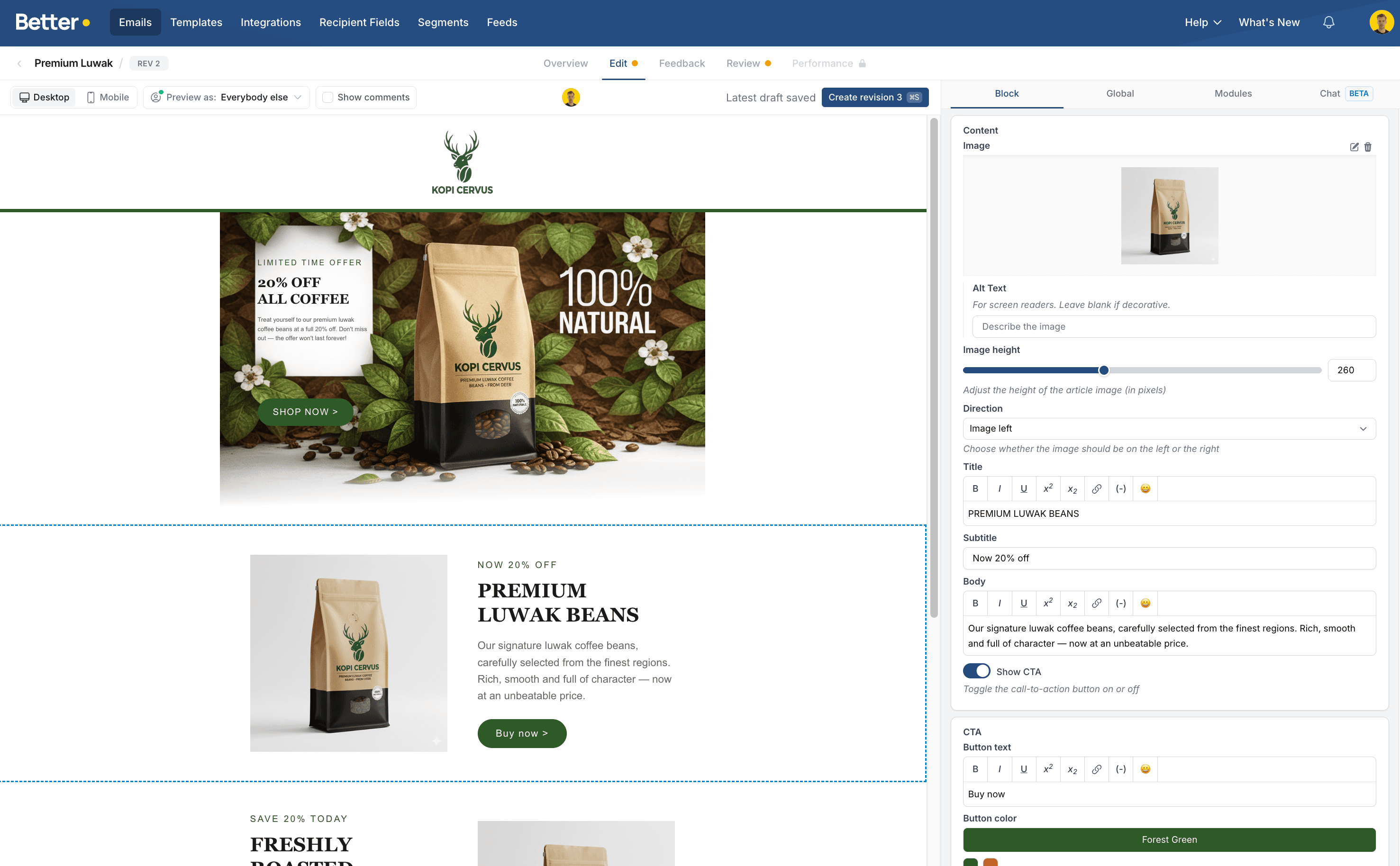
Design flexibility
Build with your real design system
Developers define the modules, rules and code. Campaign teams get visual controls that stay on brand.
The modern Taxi for Email alternative built for enterprise marketing teams. Keep your ESP, keep the modular thinking your team has already mastered, and add comments and feedback, AI, performance data from your ESP, real-time collaboration, translation and the flexibility Taxi couldn't offer.
Free migration review
Tell us about your team and we'll hand back a working Better Email sandbox, free.

“Taxi for Email was a leap forward in email design system thinking. My goal has always been to make it possible for everyone in the team to create beautiful emails. Betty makes that possible at the speed of AI.”Nicki Pabst, Co-founder
Recorded migration demo
Watch how your idea, existing modules or screenshots become the dream design system for your marketing team. This is not a migration, it's an upgrade.
Trusted by teams building at scale





Keep Salesforce, Customer.io, Adobe, Microsoft, Klaviyo, HubSpot, Braze or your current ESP. Your lists, journeys, data and sending operation stay where they are.















Performance data
After a send, opens, clicks and unsubscribes come back from your ESP into the campaign your team built. Click shares are pinned to each link on the revision that went out, so you can see which modules worked.
It works with Salesforce Marketing Cloud, Klaviyo, Mailchimp, Bloomreach, Agillic, Braze, HubSpot, Iterable and Microsoft Dynamics 365. Better Email stores campaign totals only, never recipient data.
See campaign performanceLast week's campaign
Performance · sent Nov 27, 09:00
Sent
98.7% delivered
Open rate
38,945 unique opens
Click rate
CTOR 17.9%
Unsubscribed
92 unsubs · 4 complaints
Engagement after send
3-hour buckets
Last week's campaign
Click map · Rev 4 · as sent
This week's campaign
Draft · Rev 3 · Pre-flight running
Betty
This module did not perform well in your last campaign. Do you want me to change it?
What you gain
Better Email carries modular campaign production forward and adds the tools needed for a modern collaborative workflow.
Betty
Spring campaign · Campaign Builder
Got a brief, a sheet, a catalog? Drop it in and I'll take it from there.
What changes
Real product footage replaces abstract interface mockups.
Design flexibility
Developers define the modules, rules and code. Campaign teams get visual controls that stay on brand.
Collaboration
Comments and feedback stay beside the work instead of moving across inboxes and separate tools.
Betty AI
Betty turns briefs and source content into complete campaigns inside your design system.
Your expertise carries forward
Your team already thinks in modular components, reusable blocks and brand guardrails. That knowledge does not disappear when you leave Taxi.
Better Email accelerates the approach you have already built. Keep the structure and discipline, then add collaboration, AI, translation and developer controls around it.
Built around your stack
When a required integration was not available in Taxi, your team may have had to build a workaround. Bring that requirement with you. We are always up for the challenge and will look into what is possible before agreeing the migration scope.
Tell us what needs to connect, what the current workaround does and which systems are involved.
Request a custom integration reviewFor developers
Build custom modules, edit HTML and CSS, use Liquid logic and preserve ESP specific personalization such as AMPscript and merge tags.
The design system gives campaign teams safe controls while developers keep responsibility for rendering, accessibility and code quality.
Feature parity
Switching is easier than you think. All the modular foundations you rely on are here, with the collaboration, AI and flexibility Taxi couldn't deliver.
*If an ESP charges for an integration, that amount will be included in the cost.
Customer story
“Built by experts who understand the intricacies of great email communication, Better Email gives us the flexibility and functionality to create accessible, on-brand campaigns at scale.”
Tara Knowles
Lead CRM Technology Developer, Co-op
500m+
Customer communications each year
6
Business units
SFMC
Existing sending platform retained
66%
Less time per global campaign
15×
More campaigns produced
€240K
Saved annually
“Better Email enabled us to design templates matching our brand identity while easily adjusting them as needed. The platform combines flexibility with user-friendliness, allowing rapid campaign creation without sacrificing design or functionality.”
Maria Ginnerup
Head of Marketing, Fritz Hansen
Migration timeline
A working design system in about a week. Moving every lifecycle campaign over as well usually takes two to six weeks.
Day 1
01
We inspect representative exports, modules, custom code and ESP requirements.
Days 2 to 4
02
We map your existing logic into Better Email and prepare the first working campaign.
Days 5 to 7
03
Campaign creators and developers get a focused handover before production starts.
FAQ
There is no public announcement that Taxi for Email is shutting down, and the service is running normally. We keep a page covering what we know about Taxi and its ownership under Bird. Read more.
No. Better Email replaces the campaign creation layer only. Your contacts, journeys, automations and sending stay in your current ESP.
A campaign you’ve already sent is enough to start. Two or three, as HTML, EML, PDF or an image. Our team reviews the structure and follows up with a demo built around it. Your Taxi Email Design System export is welcome but never required, and plenty of teams share it only after the first call.
Yes. Developers can work with custom HTML, CSS and Liquid while campaign teams use safe visual controls.
A typical setup can be ready in about one week. The exact timeline depends on the size and complexity of your current design system.
We review them during setup and work with your team to replicate or replace them in Better Email. If the requirement is unusual, our product team will assess what is possible before we agree the migration scope.
A Better Email specialist reviews whatever you sent alongside your current setup. We then contact you with a tailored migration scope and a demo based on your real campaign.
Choose your next step
Show us a campaign you've already sent, or request a personalized demo based on your team, design system and ESP.