Betty on monday.com
Brief Betty in monday.com.Get a finished campaign
Assign Betty, Better Email’s AI agent, to the item with the brief. She reads it, builds the campaign on your Design System, and replies on the item with a link to open it.
How it works
Assign Betty like any teammate
- 1
Write the brief on an item
What the campaign is for, the audience, key messages and dates. Add the images you want her to use to the item or its updates.
- 2
Assign Betty
Add her to the item’s People column, or @mention her in an update. She’s an agent in your monday.com account, so you pick her like a teammate.
- 3
She builds the campaign
Betty builds the full campaign in Better Email on your Design System. The item shows Working on it while she works.
- 4
She replies on the item
The item moves to Done. Her reply says what she built and what to check before it goes out, and links to the campaign.
On the item
Betty explains what she built
She reads the item’s name, board, group and column values, the whole update discussion, and the newest images on the item and in its updates.
Her reply lands under the update that asked for it. It lists what’s in the campaign and what to check before it goes out, such as placeholder images, copy she wrote herself, or links she couldn’t verify.
Coffee campaign
DoneMaja Holm
10:02@Betty build the Vandra Kaffe launch from the brief. Lead with the pouring shot, and the pouch is the product.
 pouring-mountain.png
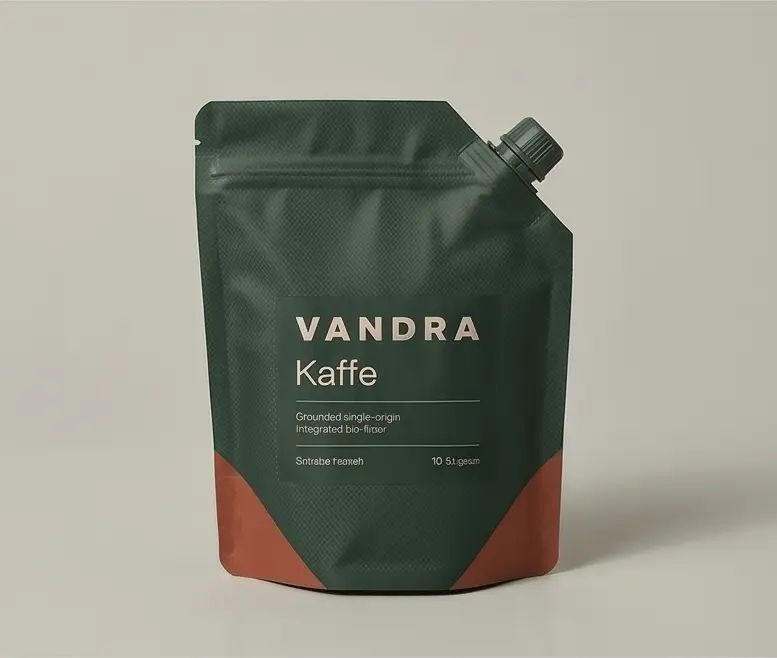 kaffe-pouch-hero.png
 filter-technology.png
Betty
10:09Built Vandra Kaffe: Leave nothing but tracks on the Vandra Design System.
What’s in it
- Hero: the pouring shot, the “Leave nothing but tracks” headline and a Shop Vandra Kaffe button
- The brew bag: the studio shot of the pouch and how to brew it
- A 90-day timeline headed “Brew it. Bury it. Grow from it.”
Before it goes out
- The pouch image is just over the 200 KB guideline.
- I made up the links (vandra.example/kaffe), so replace them with the real pages.
Open the campaign in Better Email
The board stays current
She moves the status as she goes
If the board’s status column has these labels, Betty sets them herself:
- Working on itwhen she starts
- Donewhen the campaign is ready
- Stuckif she couldn’t finish
Need changes? @mention her again on the same item. She revises the campaign she built for it instead of starting over. If the brief leaves something open, she asks in her reply and carries on once you answer.
This month
Setup
Add Betty to monday.com as an agent
Create the Betty agent in monday.com, paste its API token and signing secret into Better Email, and give her access to your boards. After that, anyone with a Better Email seat can assign her.
- She works as the person who asked, with their role up to what an Editor can do
- She finds people by the email on their monday.com account, so there’s nothing to link
- Automations can assign her once an admin allows it
monday.com
Task board agent
Webhook URL to paste into monday
API token
Signing secret
Name (optional)
The same Betty in your other tools
Betty also takes briefs in Slack threads, on Trello cards and on Asana tasks, and builds the campaign in the same Better Email organization.

Slack
Mention @Betty in a thread. She replies with a picture of the email and a button to open it.

Trello
Mention Betty on a card. She builds the campaign and replies on the card.

Asana
Assign Betty a task or mention her in a comment. She replies on the task with the link.
All integrations
Sending platforms, Figma, asset libraries, and MCP.
monday.com integration FAQ
Questions about Betty on monday.com
You need a Better Email admin and a monday.com user who can add agents. In monday.com, add Betty under Agents › Bring your agent and paste the webhook URL from Better Email. monday.com then shows an API token and a signing secret, which go into Settings › Betty AI › Connectors › monday.com. Last, share her to the agent directory so your whole team can assign her, and give her access to each board she should work on under Manage agents.
Write the brief on an item and add the images you want in the campaign. Then assign Betty to the item, or @mention her in an update on it. An assignment asks her to do what the item says, and a mention asks her to do what the update says.
The item’s name, board, group and column values, and the whole update discussion, including replies. She also looks at up to six of the newest images on the item and in its updates (PNG, JPEG, GIF or WebP) and can place them in the campaign.
She replies in an update on the item, threaded under the update that mentioned her. The reply says what she built, lists what’s in it, and points out what to check before it goes out, such as placeholder images or copy she wrote herself. It ends with a link to open the campaign in Better Email.
Yes, if the board has a status column with the labels Working on it, Done and Stuck. She sets Working on it when she starts, Done when the campaign is ready, and Stuck if she couldn’t finish. Boards without those labels keep their status.
@mention Betty again on the same item. She revises the campaign she built for it instead of starting a new one. She works on one request per item at a time, so wait for her reply before asking again.
Betty asks a question in her reply. Answer in a reply that @mentions her, and she carries on.
People with a seat in your Better Email organization. Betty finds them by the email on their monday.com account, which has to be the email they sign in to Better Email with, so there is nothing to link. Anyone else gets a short reply saying so, and she doesn’t start.
She works as the person who asked, with their role in Better Email, up to what an Editor can do. On a board she works on the campaign for that item. Everyone on the board can read her replies, so she doesn’t list or report on your other campaigns there, and she doesn’t use your Asset Library, Figma or connected sources. Ask her in Better Email for those.
Yes, once an admin turns on Let automations start Betty’s work on the monday.com connector. She then works as the person who created the automation, with their access and on your organization’s AI Credits. It’s off until an admin turns it on.
See Betty build from a monday.com item
Bring a real brief to a demo. We’ll put it on an item, assign Betty, and open the campaign she builds.